
The Google Discover 2026 Update and Content Strategy
LE VENT GLOBAL MEDIA · SEO
The Google Discover 2026 Update and Content Strategy
When Discover traffic falls, resist the immediate urge to change every headline. First distinguish which content groups are receiving fewer impressions, which pages have lost clicks and whether your website has undergone a technical change. Then improve content that genuinely serves readers’ interests. This guide turns the 2026 update into a publishing and measurement plan.

Google Discover is a feed through which users find content based on their interests. It is not assessed through an exact match to a single query typed into a search box. Ranking first in search results should therefore not create an expectation of continuous distribution in Discover. For a business blog, the aim is to attract relevant readers while ensuring that the content is useful in its own right.
Understand the focus of the February 2026 update
In its announcement of 5 February 2026, Google stated that it aimed to favour locally relevant content from users’ countries, in-depth original coverage and subject expertise, while reducing sensational content and clickbait. The initial rollout was for English-language users in the US. Do not treat this announcement as proof that every website in Türkiye experienced the same effect on the same day. [1]
The rollout recorded on the status dashboard ended on 27 February 2026, approximately 22 days after it began. The dashboard uses the US/Pacific time zone. [3] These dates can inform your analysis, but do not assume that every traffic movement during the period was caused by this update. Publishing volume, topical interest and your own website changes also belong in the review.
Build local context into the subject
Adding a city name to a headline does not make content locally relevant. There must be a real decision, practice or need that differs according to where readers live. Instead of a headline such as “E-commerce SEO in Istanbul”, for example, you could explain how a shop with a particular same-day delivery area should organise its product and delivery information. The city name matters only if it helps explain the problem being addressed.
For an SEO agency, a current local contribution might concern category naming, language usage, mobile experience problems or an anonymised implementation observation from its own market. When translating an example from another country, check delivery, currency and platform conditions. If it does not apply to Türkiye, say so or develop a different example local readers can use.
Before preparing content, collect real questions from sales and support teams. Group them by type of need rather than publishing people’s or customers’ names. Do not generalise from one conversation to an entire market to claim that “small businesses want to know this”. Use the question list to inform content selection; do not present it as market research.
Match the headline’s promise to the information on the page
A headline should tell readers what they will learn. A vague phrase such as “Google’s move that surprised everyone” conceals the scope. “Which data to check when Discover traffic declines” explains the problem the page intends to solve. You can spark curiosity, but do not manufacture it by withholding essential information.
If a headline makes a numerical promise, the content must genuinely contain that many distinct, useful steps. Do not expand a list by repeating the same advice three times in different words. Likewise, when adding an update date, do more than change the year. Record the new example, corrected information or additional explanation in the change log.
Headline approach | Problem for the reader | Clearer example |
|---|---|---|
Google has changed the rules again | The scope of the change is unclear | Content selection in the 2026 Discover update |
A method that will send your traffic soaring | An excessive promise of results | Five data points to examine when Discover traffic falls |
2026 SEO guide | The value of the update is unclear | Checking cover images against the new recommendations |
Think about how the Discover image works as a thumbnail
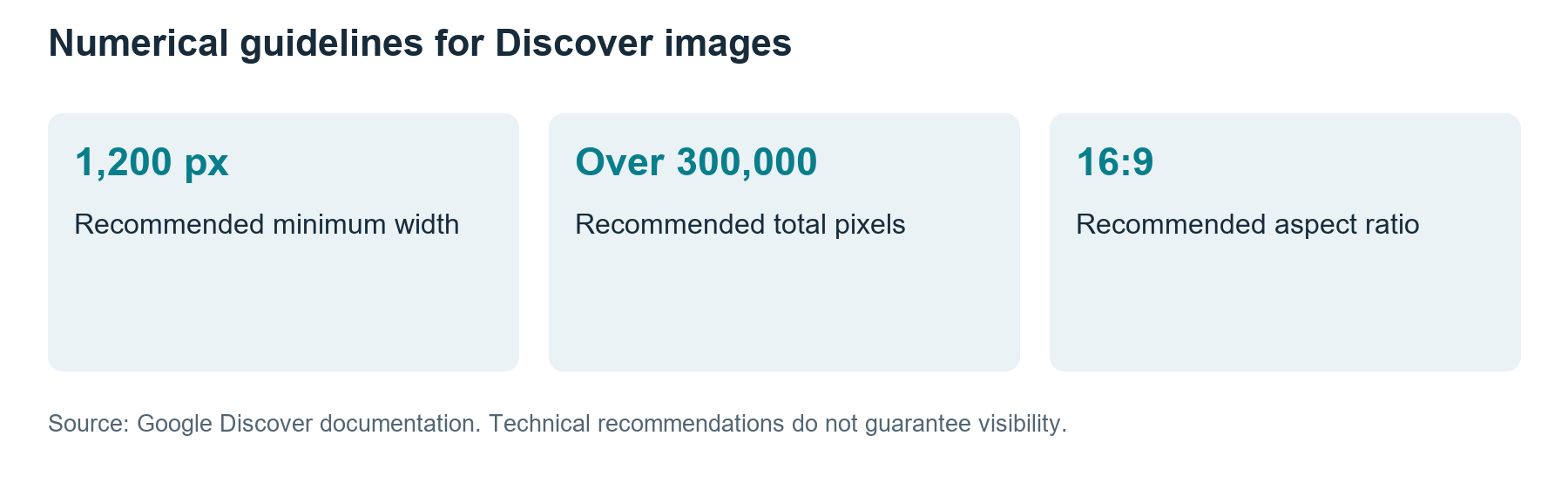
Google’s current Discover recommendations include a width of at least 1,200 pixels, more than 300,000 total pixels and a 16:9 aspect ratio. They also specify max-image-preview:large for large previews. [2] Do not interpret these as a guarantee of inclusion. The image should represent the article’s main idea clearly on a narrow screen.
For a technical topic on an agency blog, a simple visual showing the main problem may work better than a dashboard filled with tiny text. If a screenshot is necessary, enlarge the relevant area and remove personal information. The detailed chart inside an article and the cover image used for sharing need not be designed for the same purpose.
Google explains that image selection is fully automated; og:image and relevant structured data can provide signals for selection. [4] Check the page source to see which image your WordPress theme supplies. A category logo or an old image may affect the preview readers encounter even if you selected the correct cover in the editor.
Assess impressions and click-through rate together
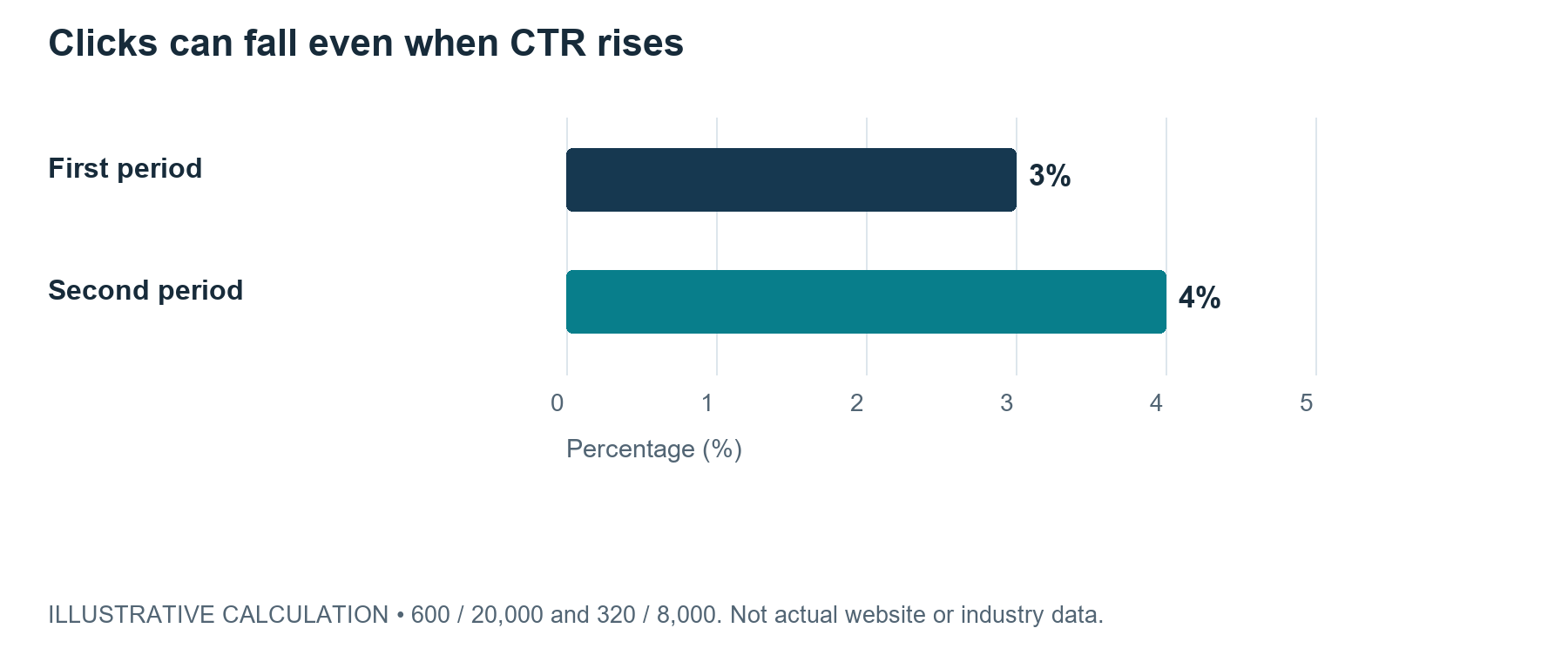
The calculation below is an illustrative example designed to explain metric interpretation. It is neither a real website’s result nor the average impact of a Discover update. Suppose one period records 20,000 impressions and 600 clicks, while the next period of equal length records 8,000 impressions and 320 clicks.
The click-through rate is 3% in the first period and 4% in the second. Impressions fall by 60% and clicks by approximately 46.7%, while CTR rises by 1 percentage point. Focusing solely on making the headline more attractive could overlook the distribution side of the problem. The example shows why a higher CTR does not always mean more visits.
Take care when combining rates too. The simple average of two articles’ CTRs may not be the CTR of all publications combined. Add clicks and impressions separately, then divide total clicks by total impressions. A high rate for one article with few impressions should not obscure a much larger loss elsewhere.
Follow a review sequence when traffic falls
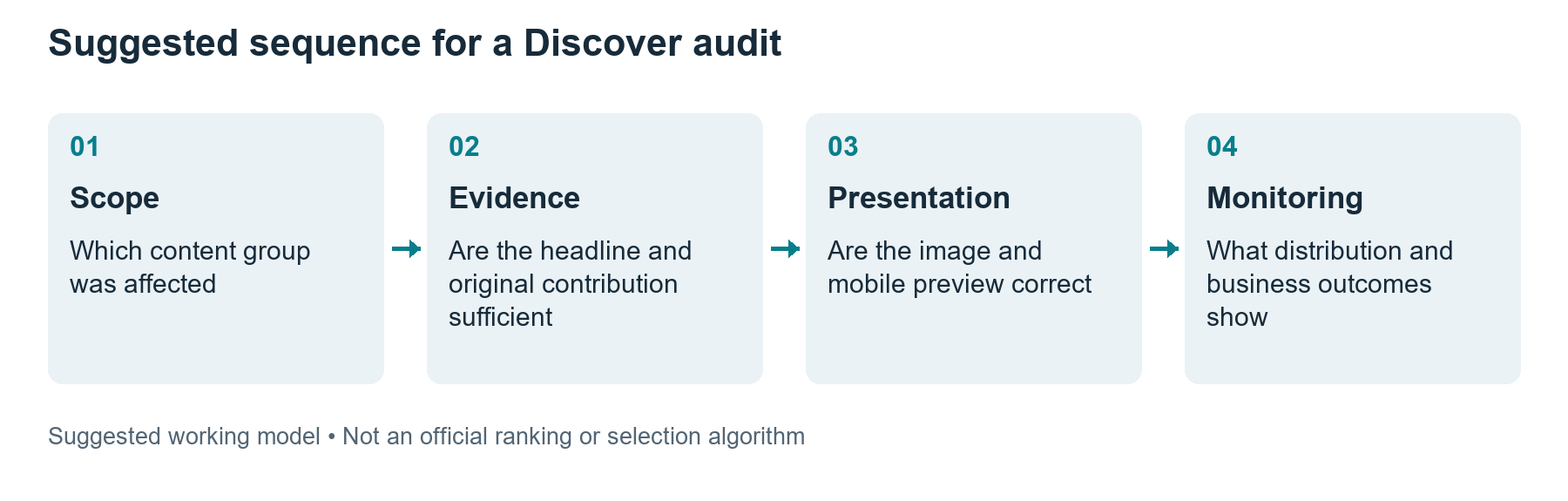
First identify when the decline began and check technical releases around those dates. Did the theme, image server, redirects or preview tags change? Then establish whether the decline affects a few articles, one category or the entire publication. Defining the scope helps avoid unnecessary changes across the whole site.
Next compare content groups. Interest in a topical news article can decline naturally. A drop in an evergreen guide may require a different investigation. Use periods of equal length and, where necessary, examine the same season as well. Do not treat a short-lived spike as the normal baseline and classify every subsequent day as a loss.
Finding | First area to examine | Evidence needed for a decision |
|---|---|---|
Impressions fell while CTR rose | Distribution and content group | Data by period and page |
A few images have lost visibility | Image URL and preview | Accessible file and correct metadata |
One topical article declined | Persistence of interest | Previous peaks and publishing schedule |
Sudden decline across the website | Technical releases and access | Error logs and change timing |
Do not confine subject expertise to a single article
Providing reliable help on a subject requires complementary explanations. A new article in a technical SEO category could link to the method in an earlier guide or to a relevant practical example. Place the link where readers are likely to want to continue. Do not produce pages answering essentially the same question merely to make a category look busy.
It helps to describe each page’s role in one sentence when planning internal links. If one provides the introductory definition, another covers a specific implementation and a third supports a comparative decision, the distinction is clear. If all three repeat the same generic advice, consider merging them or redefining their scope. This is editorial guidance, not a page-count threshold announced by Google.
Run final checks in WordPress
In the preview, confirm that the headline, cover image and first paragraph all address the same subject. Is the important part of the image cropped on mobile, is the text readable between advertisements, and are the author and date clear? Do not confuse the publication date with the update date. Google recommends consistency between visible dates and datePublished and dateModified data. [5]
Before assigning a new date, establish what changed. If a technical screen has been updated, recheck the relevant step as well. Renaming an image or advancing the year does not correct outdated content. If the plugin, theme and social sharing tags supply different images for the same page, resolve this before publishing the revision.
What to deliver during the first four weeks
In week one, identify the most affected content group and compile the technical change log. In week two, improve the headlines, local context and missing evidence in a few high-value articles. In week three, check mobile previews and images, then publish. In week four, record the initial data and set a date for a longer-term assessment.
Do not reduce success to a statement such as “We are back on Discover”. Are relevant readers taking a useful next step on the website? Actions such as consulting a source, downloading a guide or visiting a service page can be assessed against your own objectives. Content that remains useful when Discover fluctuates protects the value of your publishing investment.
An illustrative example of improving a local article
Suppose an agency is updating an article titled “Digital marketing for local businesses”. This is an editorial example, not a real customer outcome. If the article mentions a country or city but gives every business the same recommendations, its local contribution is weak. First narrow the reader’s decision: how should a business offering in-store collection explain its service area and collection conditions to customers?
Then assess the available evidence. You can use genuine branch information, the correct delivery area and an example of the page customers see. If you lack permission to share data, clearly label a constructed example as illustrative. Rather than saying “This method works for every shop”, explain the operational conditions under which it applies. Make the limitations visible so readers can compare their own circumstances.
Revise the headline after completing this content work. Instead of a promise such as “The secret method that increases local sales”, use a title that describes the actual subject, such as “Presenting in-store collection information clearly on product pages”. The visual should support the same task: a simple example showing where customers find each piece of information may be enough. Check the headline, cover and opening paragraph together in the published version.
If Discover distribution does not appear in the initial observations, do not declare the article a failure. First review its value to target customers and how existing channels use it. Can support staff link to the same page, and can the sales team explain the conditions more clearly? This usage does not substitute for measuring Discover visibility; it shows whether the content investment serves other business needs.
Do not let one traffic table determine every priority
When one content group declines, you may have three different options: correct inaccurate information, refresh visual presentation or produce new articles. A page with incorrect information may deserve attention first even if it receives little traffic. Refreshing the cover of a popular article while leaving its main explanation outdated may be the wrong priority. Justify the decision through impact, accuracy and feasibility.
Include the finding, responsible person, evidence and next review date in the task list. Broad tasks such as “Discover optimisation” conceal what changed even when marked complete. A task such as “The featured image uses an old product photograph; replace it with the correct one” is more verifiable. After making the change, check the published page preview, not just the dashboard setting.
In the final report, describe resolved errors separately from outcomes that cannot yet be measured. You can confirm that image access has been fixed; establishing whether that increases distribution may take time. This distinction lets the team demonstrate its work without relying on an uncertain success claim. Do not select the next article merely to recreate an earlier spike; investigate the relevant reader’s next question.
Frequently asked questions
Should every blog produce content for Discover
If you can contribute something original to your audience’s current interests, consider it as a publishing channel. Pursuing topics unrelated to your service solely in the hope of distribution may weaken your editorial focus. First establish reader needs and a production capacity you can sustain.
Is meeting the image dimensions enough
No. Dimensions are only one part of technical and presentation readiness. The content also needs to be relevant, understandable and useful. Adding the same image to every article may not represent each page’s subject.
Should content be deleted in bulk immediately after an update
A traffic loss alone does not establish that content is unhelpful. First examine technical problems, changing interest and the page’s contribution to users. Decisions to delete or merge content should be justified page by page.
References
Sources accessed on 27 October 2026. Announcement dates, research data periods and illustrative calculations are identified separately in the text.
[1] Google Search Central Blog. Google February 2026 Discover Core Update. 5 February 2026. Initial rollout announced for English-language users in the US.
[2] Google Search Central. Get on Discover. Eligibility, content and image recommendations. Accessed 27 October 2026.
[3] Google Search Status Dashboard. February 2026 Discover update. Rollout began on 5 February and ended on 27 February 2026. Times use US/Pacific.
[4] Google Search Central. Google image SEO best practices. Image access, context, alternative text and preferred images. Accessed 27 October 2026.
[5] Google Search Central. Influence your byline dates in Google Search. Consistency between visible dates and structured data. Accessed 27 October 2026.


