
Visual SEO for Google Lens and Circle to Search
LE VENT GLOBAL MEDIA · SEO
Visual SEO for Google Lens and Circle to Search
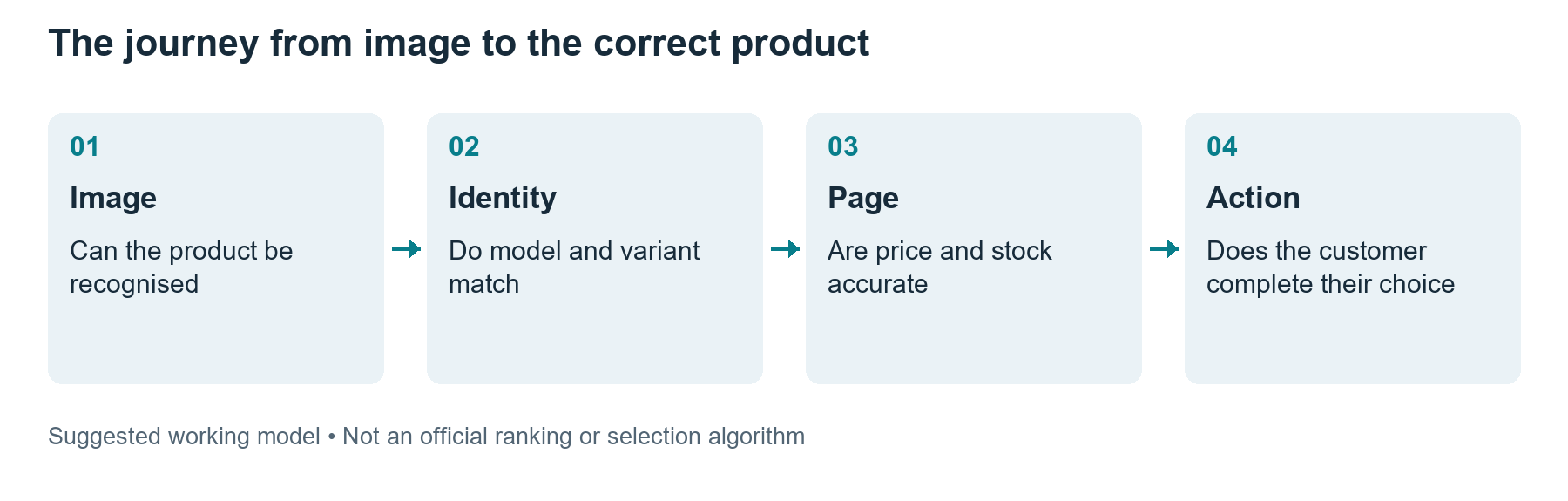
A customer can search using a product photo without knowing the product’s name. In that situation, a headline containing the right keyword is not enough. What the photograph shows, which variant the landing page represents and whether the purchasing information is accurate all become important. Assess your Lens and Circle to Search readiness across this entire journey.

This guide is intended particularly for teams managing e-commerce websites and product catalogues. The objective is to reduce uncertainty between the product a customer sees and the page they reach, rather than to guarantee visual-search rankings. Product photographs, descriptions and catalogue data should describe the same product.
Why visual-search measurement matters in 2026
On 24 September 2026, Google announced web multimodal Search reporting in Search Console. Its scope includes inputs such as Lens, Circle to Search on Android, image uploads to Google Search and image searches in Chrome. Websites receiving traffic from relevant queries can examine these data using the new search-type filter. [1]
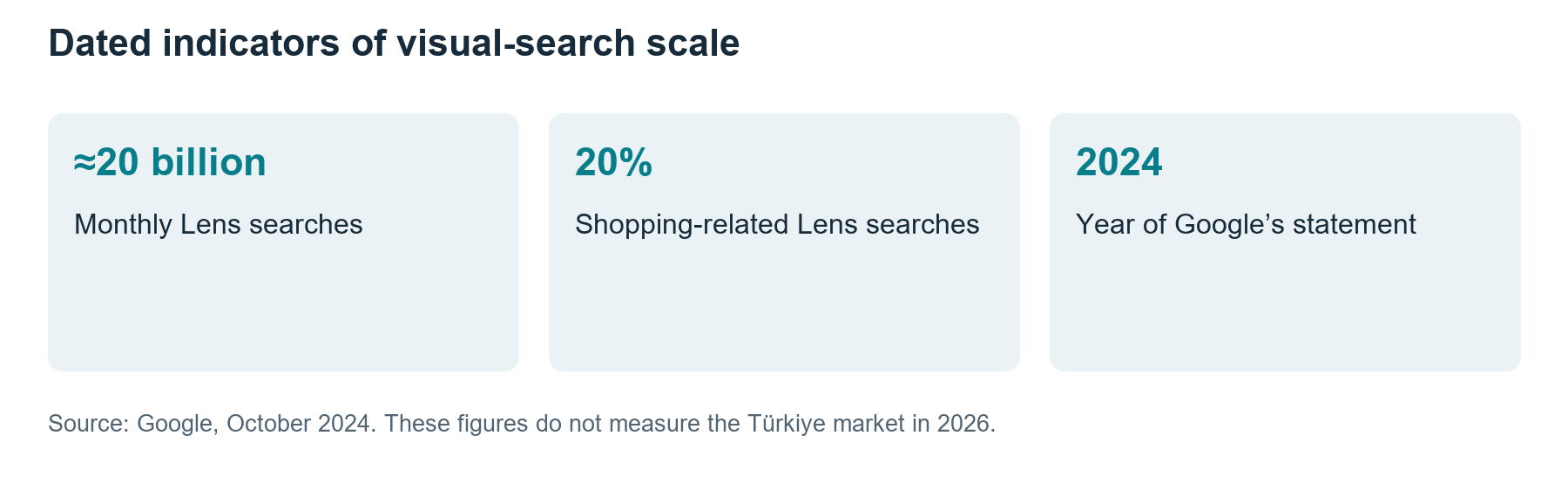
A dated indicator helps put the scale in perspective. In October 2024, Google stated that Lens was used for approximately 20 billion visual searches each month and that 20% of Lens searches were shopping-related. [2] Its February 2025 announcement put monthly searches at more than 20 billion. [6] These announcements do not measure search volume in Türkiye in 2026 or demand for your own products.
Those volumes alone do not justify an investment. Investigate whether your products are visually distinguishable and what customers are trying to work out from a photograph. If design, colour, model or component compatibility can be identified visually, there is a use case worth testing. Make the final decision using your own catalogue and customer data.
Connect the image to the purchase journey
When users search for a chair, they may be looking for the dimensions, material or exact model of a similar design, not simply the same shade of colour. The product page should explain which of these it offers. Distinguish products in the same range from the exact matching product. Suggesting something similar and saying it is the same product are different promises.
If an image of one variant opens a page for another, customers may misinterpret the displayed price and availability. On the product detail page, check the relationship between the main image, price and stock when a colour is selected. Users should not have to investigate again to establish whether the object they saw is the same as the selected product on the page.
Define the main photograph’s role
The main photograph should identify the product clearly. Supporting photographs should explain scale, material, a connection point or conditions of use. Instead of adding numerous similar angles, plan shots that answer different customer questions. You can record the decision problem each image resolves in a photography brief.
Large promotional text or labels covering the product in the main image can make it harder to understand. Catalogue images and social campaign designs have different jobs. Do not edit a product photograph to make the object appear different from what it is. Concealing differences in colour or material can turn a short-term click into a post-sale problem.
Image type | Need it addresses | Checkpoint |
|---|---|---|
Main product photograph | Which product is shown | Object is clear and shows the correct variant |
Scale photograph | Whether the size suits the intended use | Dimensions are also provided as text |
Detail photograph | What the material or connection is like | Detail genuinely belongs to the product |
In-use setting | How it would look in my setting | No misleading size or colour |
Add meaningful context to the page containing the image
Google explains that it uses alternative text, the content surrounding an image and computer vision together to understand the image’s subject. It recommends short, descriptive filenames and helpful alternative text. Keyword stuffing does not serve that purpose. [3]
For example, instead of “desk lamp, cheap desk lamp, lamp prices”, write “Desk lamp with a black metal body and adjustable arm” if that accurately describes the product. Relating the filename to the model also makes editorial organisation easier. Do not use alternative text to mention an invisible feature or an unverified quality claim.
Check that the page title, product name and image description refer to the same object. Information such as materials, dimensions and limitations of use should not exist only as text embedded in an image; it also belongs in accessible page text. Someone using a screen reader can then access the same essential information.
Audit technical access alongside product data
Check that the image URL actually returns an image file. Expired signed URLs, access blocks or incorrect redirects can hide it from users or crawlers. Examine whether the smaller mobile version and larger file are correctly associated. Use appropriate sizing that retains quality rather than serving unnecessarily large files.
Product structured data can help prices, availability and other product information appear more richly, including in Google Images and Lens. [4] Compare the markup with the information users see. Structured data does not guarantee that a product will be selected in search or that the correct price will always update immediately.
In Merchant Center, image_link is a separate operational concern. The current help page announces a minimum requirement of 500×500 pixels from 31 January 2027 and recommends 1,500×1,500 or higher. [5] Do not describe a future requirement as though it already applies to everyone in 2026. When working on a catalogue, check current policy alongside diagnostics in your account.
Start with a small catalogue test
For the first pilot, choose a commercially important product group whose photographs you can improve and whose products are liable to be confused. Simply listing product names as though building a keyword list is insufficient. Record realistic visual scenarios separately, such as a plain-background photograph, a product in use and a close-up detail. A photograph uploaded by a user may differ substantially from your studio photography.
Your observation form should include the test date, country, device, input image, displayed product and destination URL. Classify exact matches, similar products and incorrect variants separately. Results can vary with location and time. A manual test does not represent the distribution of real users or all of Google’s source selections.
Describe match quality numerically
In the illustrative example below, suppose 72 of 120 image scenarios produce a relevant product group, 54 produce the correct model and 42 the correct variant. These are not actual test results. Dividing each count by the same 120 scenarios produces 60%, 45% and 35% respectively. Each subsequent stage is a subset of the preceding one.
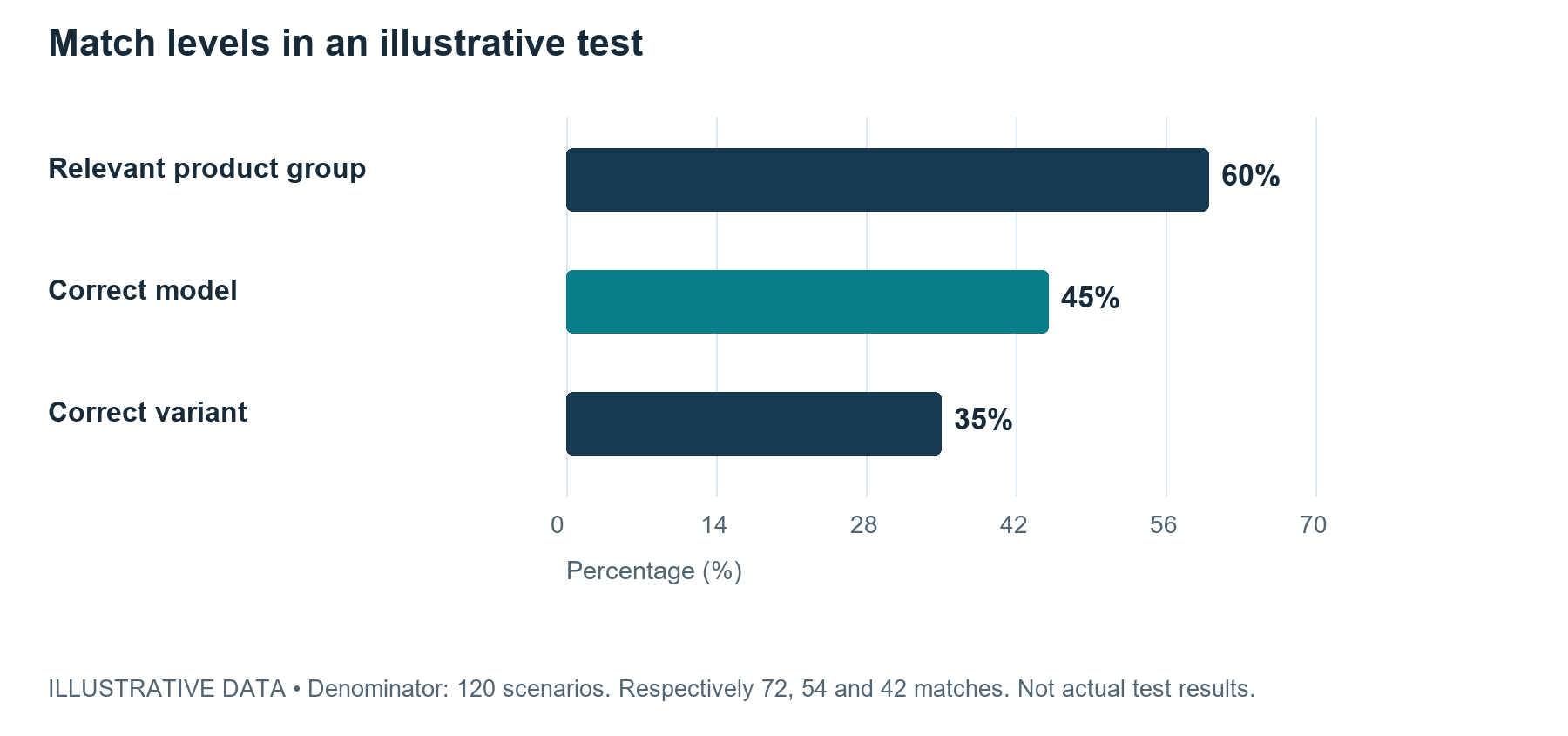
When turning this table into a customer report, state the method and denominators. “A 60% success rate” can be misleading if it merely means a similar product was found. A product-group match and a match to the correct orderable variant have different business value. Use that distinction to prioritise fixes too.
Symptom | Possible area to examine | Verification evidence |
|---|---|---|
Correct model, wrong variant | Image-to-variant association | Selected colour and destination URL |
Photograph cannot be found in search | File access and page context | Accessible image URL |
Clicks but few orders | Availability, price and selection journey | Landing-page and sales data |
Incorrect product description | Catalogue mapping | Model, SKU and product identifier |
Do not confuse Search Console data with sales data
Observing visibility or clicks in the multimodal Search report does not establish that an order was completed. Assess landing-page visits and the purchase journey separately in your analytics system. Do not assume you can attribute every visual-search click individually to Lens or Circle to Search; use the breakdown the interface actually provides.
For example, if visual-search clicks increase but customers leave while selecting variants, check whether the photograph takes them to the correct object. If the product is found but out of stock, photography is not the only issue. The page can clearly offer similar alternatives; it should not portray an unavailable product as available.
Publication checks in WordPress and the shop platform
If you use WooCommerce or another catalogue plugin, examine which URLs are generated for main-product and variant images. Test how long old cached images remain visible after an upload. Do not consider the work complete after changing a picture in the administration panel without checking the product page.
A comparison table added to a product description must be readable on mobile. Alternative text should describe the product rather than repeat a filename or brand slogan. If you use the same image on many pages, ensure this is an intentional catalogue decision. Assigning the same main photograph to different products compounds data-quality problems.
Assign clear responsibilities across the team
The photography team can oversee product recognition, the catalogue team variant accuracy, the technical team access and data consistency, and marketing measurement. Assign each finding to one accountable person and a piece of verification evidence so an image problem does not disappear between four teams. Correcting wrong product matches may be more valuable than revising hundreds of filenames first.
At the end of the pilot, do more than report that “images were optimised”. State what changed in which product group, which errors remain in the sample and when the next check will take place. Investigate separately whether increased exposure for an image translates into more sales of the correct product.
An illustrative example of resolving variant confusion
Suppose a shop sells the same chair model in walnut and light oak. In this example, both products have accidentally retained the same main photograph. If users see the light-oak chair in visual search but the page opens with the walnut variant selected, changing the filename alone is insufficient. Examine which variant and page state the photograph is associated with.
First, the catalogue team verifies product and variant identifiers. The photography team maps the correct files to each colour. The technical team checks the default selection, image changes and data output. Marketing records which image leads to which URL in the published experience. These are quality checks to prevent customers from seeing the wrong product, rather than a ranking experiment.
After the correction, you can repeat manual observations using the same images. However, a search result changing on another day does not by itself measure the correction’s effect. Record the result conditions and demonstrate on your own page that the catalogue error has actually been resolved. Broader claims about source selection or the appearance of competitors’ products require a more systematic observation design.
Once customers reach the page, colour selection should be easy to find. Do not expect them to resolve inconsistencies between the photograph and product name. If an image is illustrative, say so clearly; the specifications and variant to be delivered must still be described accurately. In catalogues selling similar products, this clarity is necessary regardless of photographic quality.
Which products deserve the photography budget
Rather than taking the same number of photographs for every product, consider purchasing uncertainty. For a connector, dimensions and the shape of its ends may matter most; for a textile product, texture and colour; for furniture, scale and setting. State which question each photograph answers in the shot list. This reduces unnecessary image production undertaken simply to look different.
You could begin with frequently sold, frequently returned or easily confused products. These priorities should come from your own business records. Do not assume photography is the problem without examining return reasons; descriptions, manufacturing differences or delivery may also play a part. Support the image revision plan with those findings and give every change a verification step.
Ask someone who did not prepare the photographs to perform the final check. Can they understand the model, variant and basic dimensions from the page? Assess the same question from the perspective of a reader unfamiliar with the product. This small usability review is not formal market research; it is a way to identify unclear information and misleading expectations early.
Frequently asked questions
Do we need a special keyword list for Lens
The product names and attributes customers use are helpful, but do not reduce visual matching to keyword repetition. The photograph, product information and landing page should describe the same object.
Is a larger image always better
Meet the relevant channel’s requirements while providing legible quality. Unnecessarily large files can impair mobile experience. Assess product detail, the correct crop and file accessibility alongside dimensions.
Is it an error if a similar competing product appears
Visual search is not required to return only the exact model in every situation. First check that the identity of the product on your own page is clear and correct. Do not turn a manual observation into a ranking guarantee.
References
Sources accessed on 27 October 2026. Announcement dates, research data periods and illustrative calculations are identified separately in the text.
[1] Google Search Central Blog. Announcing web multimodal Search performance reporting in Search Console. 24 September 2026. Reporting on Lens, Circle to Search and other visual inputs.
[2] Google Blog. Google Lens and AI Overviews new ways for marketers to reach customers. 3 October 2024. Approximately 20 billion monthly Lens searches and 20% shopping-related; not Türkiye data for 2026.
[3] Google Search Central. Google image SEO best practices. Image access, context, alternative text and preferred images. Accessed 27 October 2026.
[4] Google Search Central. Introduction to Product structured data. Product information and its context in Google Images and Lens. Accessed 27 October 2026.
[5] Google Merchant Center Help. Image link image_link. Product image rules and the minimum size change announced for 31 January 2027. Accessed 27 October 2026.
[6] Google Blog. Use Lens to search your screen while you browse on iOS. 19 February 2025. Statement reporting more than 20 billion visual searches per month.


